monday.com Pro vs. Enterprise: How to Choose the Right Plan for Your Company's Stage of Growth
June 23, 2026
Most organizations that outgrow monday.com Pro don't realize it immediately. The signal is usually subtle at first: a department head asking for more granular access controls, an operations leader frustrated that their dashboards can't pull from enough boards at once, an IT team uncomfortable that they can't audit who accessed what and when. The platform still works. It just no longer fits.
If your organization is at that inflection point — or approaching it — this guide is designed to give you a clear, honest picture of what actually separates the Pro and Enterprise plans, and more importantly, what kind of organization each one is built for.
The most useful way to frame the Pro vs. Enterprise decision isn't by listing features side by side. It's by understanding what problem each plan is fundamentally designed to solve.
Pro is built for teams that want to track, manage, and execute their daily work more effectively. It gives small teams the tools to run structured projects, automate repetitive tasks, build useful dashboards, and collaborate without chaos. It's a productivity multiplier for teams that have clear ownership and a manageable scope.
Enterprise is built for organizations that need to govern how work happens across departments, divisions, and geographies — not just execute it faster. The jump to Enterprise is less about getting more features and more about gaining the infrastructure required to operate monday.com at organizational scale: AI that works with full company context, governance controls that satisfy IT and compliance requirements, portfolio visibility across hundreds of projects, and resource management that spans teams rather than individual boards.
With Pro, you automate tasks. With Enterprise, you automate the organization.
Both plans include monday Sidekick — monday.com's AI assistant — but the version each plan includes is meaningfully different in how it operates and what it can access.
Pro includes Sidekick Lite, which gives each user individual AI assistance within their workspace. You get up to 5 AI messages per user per day, workspace-level context (the AI sees your boards and items), and text-based capabilities like summarization, writing assistance, and formula help.
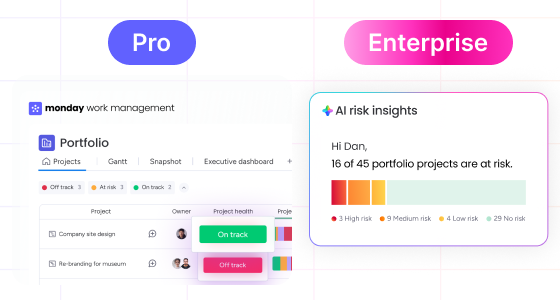
Enterprise includes Sidekick Plus, which operates at the account level. The AI has context across your entire organization — not just one workspace, but all workspaces, boards, and connected data. Users get up to 100 AI messages per user per day, plus the ability to generate images and videos directly within the platform (2 instances per user per day). More importantly, Sidekick Plus in Enterprise is integrated into portfolio management: it can surface which of your 45 active projects are at risk, identify the root causes, and generate an executive summary you can share with leadership in seconds.
With Pro, AI helps individuals work faster. With Enterprise, AI helps leadership make better decisions. That's a different kind of value proposition, and it's one of the clearest signals of whether your organization is ready for Enterprise.
For more context on how monday.com's AI capabilities work in practice, see our full breakdown of monday.com AI in 2026: Sidekick, Vibe, and Agents.
The automation ceiling is one of the most practical differences between the two plans, and it's one that organizations often underestimate until they start hitting it.
Pro gives you 5 active AI-powered workflows and 25,000 automation actions per month, with basic integrations. For a team running a handful of projects with standard notification and status-change automations, that's often sufficient. But automation needs tend to compound as organizations mature: more boards, more teams, more cross-functional triggers, more integrations with external tools. A growing operations team running 20 boards with active automations on each can consume a significant portion of that monthly budget faster than expected.
Enterprise gives you 250 active AI-powered workflows and 250,000 automation actions per month — a 10x increase — along with premium integrations that expand the ecosystem of tools you can connect. Organizations running monday.com across multiple departments, with automations spanning HR, Marketing, Finance, and Operations simultaneously, need this headroom to avoid hitting limits that interrupt live workflows.
The distinction also extends to the nature of the automations themselves. Enterprise supports cross-board and cross-workspace automation at a scale that Pro can't match — which matters when you're building workflows that span organizational boundaries rather than just individual teams. Our guide to custom automations in monday.com walks through what becomes possible at that scale.
Pro supports unlimited boards for managing individual projects, plus basic dependencies between them. For a team managing three to ten concurrent projects with a defined scope, this is more than adequate. But for an organization managing fifty or a hundred projects simultaneously — across business units, regions, and initiative types — Pro's project management capabilities have meaningful constraints.
Enterprise adds the infrastructure for portfolio management at organizational scale:
Cross-project dependencies. Enterprise lets you map and track dependencies between projects, so when one project runs late, the system surfaces the downstream impact on every related project. This is critical for PMO teams managing programs where delays in one workstream directly affect others.
Managed templates. Enterprise lets administrators create and enforce standardized project templates across the organization. When you're onboarding a new project team or launching a new initiative type, managed templates ensure consistent structure from day one — rather than every team building their own boards from scratch and creating a patchwork of incompatible formats.
Sidekick for PMO. The Enterprise AI assistant has specialized knowledge of project portfolio management. It can generate risk reports, identify projects that are at risk of timeline or budget overruns, and surface ownership issues — across all active projects, not just the one you're currently looking at.
Executive reporting. Enterprise includes AI-generated, customizable executive summaries that can be shared with leadership in seconds. For organizations that produce weekly or monthly project status reports for senior stakeholders, this replaces a significant amount of manual reporting effort.
If your organization is trying to build a true PMO function on monday.com, the scalable project portfolio management capabilities in Enterprise are what make that possible.
This is an area where the difference between the two plans is stark, and it's one that growing organizations feel acutely as their teams and projects multiply.
Pro includes a workload widget that helps you understand resource capacity at the level of an individual project board. You can see how much work is assigned to each person on a given board and adjust accordingly. For a single team managing their own projects, this is useful.
Enterprise replaces this with a full resource management system that operates across the entire organization:
AI-recommended resources. When assigning work, Enterprise suggests the right person based on their skills, current availability, and location — drawing from data across all active projects, not just the one you're looking at.
Capacity planning. Enterprise lets you plan resource needs across all projects before assignments are made — so you can identify resource conflicts before they become delivery problems rather than after.
Capacity management. The system actively prevents over-assignment and under-utilization, surfacing imbalances in real time so managers can redistribute work before people burn out or projects stall.
Planned vs. actual tracking. Enterprise compares assigned effort against real effort logged, making it possible to identify where estimates are consistently off and correct them for future planning cycles.
For organizations where resource conflicts are a recurring source of delivery risk, this is one of the highest-value differences between the two plans. See how this connects to balancing capacity and demand across teams.
Pro dashboards connect up to 20 boards per dashboard, which is sufficient for team-level visibility. If you're building a dashboard for a single department's projects and metrics, 20 boards is rarely a constraint.
But for organizational-level reporting, Pro's limit creates a real ceiling. An operations leader trying to build a single dashboard that pulls from all active projects across five business units — potentially 60 to 80 boards — runs into that limit quickly.
Enterprise raises the ceiling to 50 boards per dashboard and adds capabilities that transform reporting from a manual process into a live, automated function:
Portfolio dashboards. Connect hundreds of projects into a single snapshot or portfolio view. This is what enables true C-suite visibility across the organization.
Automated report scheduling. Enterprise lets you schedule reports to be generated and delivered automatically to your inbox on a defined cadence — weekly, monthly, or triggered by project milestones. The manual process of pulling data, formatting it, and distributing it is replaced entirely.
Dynamic pivot analysis. Enterprise adds pivot-style data visualization and analysis directly inside monday.com, letting analysts slice and filter board data without exporting to external BI tools.
AI-generated reports. Sidekick Plus can generate executive-ready reports on demand, formatted for stakeholder distribution in seconds rather than hours.
The difference is not just quantitative (more boards per dashboard) — it's qualitative. Enterprise reporting is built around the assumption that leadership needs real-time visibility across the whole organization, not periodic summaries assembled by hand. This connects directly to the broader principle of turning reporting into action rather than just documentation.
For many organizations, this category alone determines which plan they need. If your industry has compliance requirements — financial services, healthcare, legal, government — or if your IT team needs to maintain meaningful control over data access and user activity, the governance gap between Pro and Enterprise is significant.
Pro includes essential security and basic administrator controls, with board-level permission management. It's appropriate for teams that need standard security without complex governance requirements.
Enterprise adds a full governance stack:
AI governance controls. Enterprise gives account administrators visibility and control over AI activity, usage, and permissions across the entire account. As AI becomes a core part of how work gets done, the ability to govern it at the organizational level — rather than leaving each user to configure it individually — becomes a compliance requirement rather than a nice-to-have.
Advanced role-based permissions. Enterprise supports custom account roles that go far beyond the default Admin / Member / Viewer / Guest structure. You can define granular permissions at every level — which teams can create boards, which roles can export data, which users can access specific workspaces — and enforce them consistently across the organization.
Private workspaces. Enterprise adds the ability to create workspaces that are invisible and inaccessible to users who aren't explicitly invited. For sensitive initiatives — M&A work, executive strategy, HR investigations — this provides the isolation that Pro's board-level permissions can't deliver.
SCIM provisioning. Enterprise integrates with your identity provider (Okta, Azure AD, etc.) to automatically sync user provisioning and deprovisioning. When an employee joins, their monday.com access is provisioned automatically. When they leave, it's revoked. This eliminates the manual account management overhead that creates security gaps in rapidly growing organizations.
Audit logs. Enterprise provides a complete record of who accessed what, when, and from where — across the entire account. For industries with data access compliance requirements, this is non-negotiable.
Session management. Administrators can view and reset active sessions from the admin panel, providing control over access that Pro simply doesn't include.
For a deeper look at how these controls work in practice, see our guide to advanced access control in monday.com.
Pro includes chat support and a self-service knowledge base — appropriate for teams that can troubleshoot independently and don't need platform-level strategic guidance.
Enterprise makes organizations eligible for dedicated Customer Success services: a named point of contact who understands your specific implementation, your business objectives, and your roadmap for expanding how you use the platform. For organizations that are deploying monday.com across multiple departments or running complex workflows, this access to a strategic partner — rather than a support ticket queue — can meaningfully accelerate the time it takes to get real value from the investment.
This is particularly relevant for organizations going through a significant workflow transformation. The difference between having a support chat and having a dedicated success manager who can help you design your implementation is the difference between figuring it out yourself and having an expert guide the rollout. For context on how that transition typically works, see our piece on change management best practices for monday.com adoption.
Rather than running through a feature checklist, the more useful exercise is to map your current operational reality against the signals that consistently indicate an organization has outgrown Pro.
You're managing work across multiple departments or business units. When monday.com is no longer a tool for one team but a platform for the organization, the governance, reporting, and automation scale of Enterprise becomes necessary rather than optional.
Your IT or security team has compliance requirements. If your industry or internal policies require audit logs, SCIM provisioning, role-based access controls, or AI governance, those requirements point directly to Enterprise. Pro cannot satisfy them.
You're hitting automation limits. If your teams are running workflows that approach or exceed the Pro automation ceiling, or if you need cross-workspace automation, the limit itself is affecting your operations. That's a clear signal.
Leadership needs portfolio visibility. If the CEO or COO is asking for a single view of all active projects and their status — and someone has to manually compile that view for every meeting — you're describing an Enterprise problem. The dashboards and portfolio capabilities in Enterprise exist specifically for this.
Resource conflicts are a recurring delivery risk. When project delays are regularly caused by the same people being assigned to too many things at once, and there's no systematic way to see that conflict before it becomes a problem, the organizational resource management in Enterprise addresses this directly.
You need standardized processes at scale. If you're deploying monday.com to 10 or more teams and need them to follow consistent structures, managed templates and advanced permissions make that enforceable rather than aspirational.
Conversely, Pro is the right choice when your monday.com usage is primarily within a single team or department, when your security requirements are standard rather than compliance-driven, and when your automation and reporting needs stay well within the plan's limits. Pro is a genuinely capable plan for the organizations it's designed for — the issue is recognizing when you've grown past it.
The risk of staying on Pro longer than your organization's needs warrant isn't just about missing features — it's about the organizational cost of working around the absence of those features.
When governance controls are insufficient, IT teams build manual processes to compensate. When portfolio dashboards can't pull from enough boards, someone assembles a weekly report by hand. When automation limits are hit, teams revert to manual handoffs. When resource conflicts aren't visible, delivery risks go undetected until they're already affecting timelines.
Each of these workarounds has a cost: time, quality, and the gradual erosion of confidence in the platform as a whole. Organizations that grow into Enterprise at the right moment — rather than after accumulating a year of workarounds — tend to see significantly faster adoption and a much stronger return on the investment.
Understanding the hidden costs of inadequate process infrastructure is often what finally makes the case for upgrading internally.
The most effective way to determine whether Enterprise is the right move for your organization is to run an honest assessment of your current pain points against the specific capabilities that Enterprise adds.
Start by asking your operational and IT leaders the questions that matter: Are we hitting automation limits? Do we have compliance requirements we can't meet on Pro? Can leadership get the portfolio visibility they need without someone manually compiling it? Are resource conflicts creating delivery problems we can predict but not prevent?
If more than two of those questions surface a real problem rather than a hypothetical one, the case for Enterprise is likely stronger than the incremental investment it represents.
GB Advisors works with organizations to evaluate their monday.com setup against their operational needs and help them make a confident, well-informed decision about plan selection and implementation. If you're at this decision point, talk to a monday.com specialist at GB Advisors — we can run a workflow assessment that gives you a clear picture of where your current plan is creating friction and what Enterprise would actually change for your organization.