From Manual Tasks to Smart Workflows: The Power of Workflow Automator in Freshservice
April 27, 2026
In an environment where user demands are constantly increasing, IT teams are expected to deliver faster, more reliable, and consistent services—without sacrificing operational efficiency. However, manual tasks, disconnected processes, and lack of visibility can quickly become obstacles that impact productivity, employee experience, and service quality.
This is where automation becomes a key factor in strengthening IT service management. In this article, we’ll explore how organizations can leverage it to move toward a more mature ITSM, optimize repetitive tasks, and improve the way they manage their technology services.
To achieve this, Freshservice offers features designed to simplify and automate key processes. One of the most important is Workflow Automator, a tool that enables teams to create intelligent workflows to reduce manual effort, accelerate request resolution, and keep IT operations under control.
Before diving into practical examples, it’s worth understanding what Freshservice Workflow Automator is and why it has become a key feature for modern IT service desks.
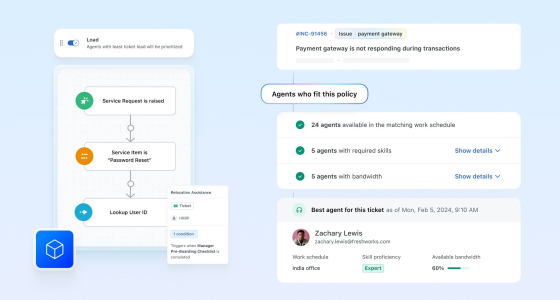
Freshservice Workflow Automator is a visual, no-code builder that enables teams to design and implement automated workflows for different ITSM scenarios. With this feature, teams can create workflows triggered by specific events, such as ticket creation, status changes, field updates, or approval requests.
From there, the system evaluates predefined conditions and executes automated actions, such as assigning tickets to the right team, updating properties, sending notifications, escalating requests, requesting approvals, resolving repetitive tasks, or triggering webhooks to connect Freshservice with other tools.
Its real value lies in helping teams turn manual and scattered processes into consistent, measurable, and easy-to-control workflows. This reduces human error, accelerates response times, improves SLA compliance, and frees IT teams from time-consuming operational tasks.
In short, Workflow Automator acts as the engine that enables IT teams to deliver faster, standardized, and reliable services, keeping operations under control even as request volume or process complexity increases.
Implementing IT automation through Freshservice brings measurable improvements across your service desk operations. Here’s how the Workflow Automator benefits IT teams and organizations:
One of the most common, and at the same time most critical, applications of Freshservice Workflow Automator is the automatic classification and prioritization of tickets. While it may seem like a basic process, in practice, it is one of the biggest bottlenecks for many service desks.
In many organizations, tickets often arrive with incomplete, disorganized, or unclear information. This forces agents to spend time interpreting the request, manually classifying it, and assigning it correctly. The result: unnecessary delays, inconsistent support, and risks to SLA compliance.
With a well-designed workflow, this process can be automated from the start, ensuring speed and consistency. For example:
Trigger: A new ticket is created through any channel, such as email, self-service portal, or chat.
Conditions: The system automatically analyzes the ticket content for keywords such as “server down,” “urgent,” or “no access,” along with fields like impact, urgency, or request type.
Automated actions:
The value of this approach is not only in reducing the team’s operational workload, but also in ensuring that each ticket receives the right treatment from the start, without depending on each agent’s individual interpretation.
In addition, this type of automation makes it easier to scale as request volume increases, while maintaining consistent response times and improving the end-user experience. Critical incidents are addressed faster, while lower-impact tickets follow an optimized flow without manual intervention.
Manual approval chains often become one of the main obstacles in IT service management, especially when it comes to change requests. When approvals depend on emails, manual follow-ups, or informal reminders, processes become slow, less visible, and prone to delays.
With Freshservice Workflow Automator, teams can design dynamic, multi-level approval workflows tailored to the risk, impact, and scope of each request. This means not every change has to go through the same process; instead, each one receives the appropriate level of oversight based on its criticality.
For example, in a software update request:
Trigger: A change request is created with “Software Update” as the change type.
Conditions: The workflow validates whether the update affects business-critical applications, requires downtime, or has an estimated downtime of more than 2 hours.
Automated actions:
The value of this type of automation lies in its ability to balance agility and control. Simple changes can move forward faster, while higher-impact changes receive the necessary review before execution.
By centralizing approvals within the workflow, teams also reduce the need to chase updates by email or constantly ask about the status of a request. Everyone involved stays informed, while the IT team gains greater traceability into who approved what, when, and under which conditions.
Service level agreement (SLA) breaches can directly impact users’ trust in the IT team. When a critical ticket does not receive timely attention, the issue is not only delayed; it can also affect productivity, operational continuity, and the overall perception of the service.
In many service desks, escalation still depends on manual reviews, isolated alerts, or individual follow-up by agents. This can create inconsistencies and cause high-priority tickets to go unnoticed until they are close to breaching an SLA, or even after the SLA has already been missed.
With Freshservice Workflow Automator, teams can configure automatic escalation rules that act proactively based on time, priority, user type, or ticket impact.
For example:
Trigger: A ticket remains in “Open” status for 60 minutes without an agent response.
Conditions: The workflow applies only if the ticket belongs to a “VIP User” or has “High” priority.
Automated actions:
The real value of this workflow lies in helping teams move from reactive management to preventive management. Instead of identifying SLA breaches after they happen, the team can intervene earlier, protect the experience of critical users, and maintain control over service commitments.
Likewise, every action is recorded, providing traceability for audits, performance reports, and future analysis. This helps identify patterns, such as overloaded teams, ticket categories that require more resources, or processes that need optimization.
Employee onboarding and offboarding are ideal processes to automate in Freshservice. Both involve multiple steps, different teams, and precise coordination to avoid delays, errors, or security gaps.
When these processes are managed manually, it is common for tasks to be forgotten, duplicated, or completed late. For example, a new employee may start without access to the tools they need, or an employee leaving the company may keep active permissions longer than they should.
With Freshservice Workflow Automator, IT teams can automatically organize all required tasks from the moment an onboarding or offboarding request is submitted.
For example:
Trigger: An “Employee Onboarding” or “Employee Offboarding” service request is created in Freshservice.
Conditions: The workflow validates whether the request is for a full-time employee, contractor, remote worker, or office-based employee.
Automated actions:
The value of this automation lies in ensuring that every process follows a clear and standardized path, without relying on scattered emails, spreadsheets, or manual reminders. This improves the new employee experience, reduces the time needed for them to start working, and gives all teams involved greater visibility.
In the case of offboarding, the impact is even more critical: automating access revocation, asset recovery, and record updates helps reduce security risks and protect company information.
By centralizing these checklists in Freshservice, the IT team can also analyze process metrics, identify bottlenecks, and continuously improve the onboarding and offboarding experience.
When a major incident occurs, clear, fast, and consistent communication is just as important as the technical resolution. Users need to know what is happening, which services are affected, and when they can expect an update. At the same time, leaders and impacted teams need visibility to make decisions and reduce uncertainty.
However, when communications are managed manually, delays, inconsistent messages, or duplicated efforts can arise. Under pressure, the IT team may end up responding to multiple individual inquiries instead of focusing on resolving the incident.
With Freshservice Workflow Automator, teams can standardize and automate communications related to major incidents.
For example:
Trigger: A major incident is detected based on ticket type, category, impact, or manual tagging by an agent.
Conditions: The workflow validates whether the incident affects a critical service, multiple users, a specific location, or a particular group.
Automated actions:
The value of this automation lies in reducing uncertainty and keeping everyone aligned with reliable information. Users receive timely updates without having to open additional tickets or contact the support team directly.
In addition, the IT team can reduce the burden of manual communication and focus on investigating, containing, and resolving the incident. This improves internal coordination, prevents contradictory messages, and reinforces trust in the service desk.
The success of workflow automation is about more than enabling a few rules. It requires strategic design, continuous optimization, and a clear understanding of the processes you want to improve.
Here are some best practices to maximize its impact:
The true power of Freshservice Workflow Automator lies in its ability to extend automation beyond Freshservice. By using webhooks, APIs, and pre-built integrations, IT teams can connect different tools and automate processes across their entire technology ecosystem.
This allows the service desk to move from operating as an isolated system to becoming a central coordination point for multiple teams, platforms, and processes.
For example, with Workflow Automator, you can:
The value of these integrations lies in eliminating silos, reducing repetitive tasks, and ensuring information flows between the right systems at the right time. Instead of relying on manual updates or switching between multiple platforms, teams can create connected, consistent, and traceable processes.
Ready to unlock the potential of Workflow Automator in Freshservice? To get started, you don’t need to automate everything at once. The best approach is to begin with a simple, repetitive, high-impact process and then scale gradually.
These steps can help you build your first automation:
Starting with a well-defined automation allows teams to achieve quick wins and demonstrate the value of Workflow Automator from the beginning. As the team gains confidence, it can expand its use to more complex and strategic processes within IT service management.
Freshservice Workflow Automator is much more than a time-saving feature: it is a key enabler for transforming IT service management. By automating tasks that were once manual, slow, and prone to errors, it allows IT teams to work more efficiently, reduce operational friction, and dedicate more time to strategic initiatives.
Whether you want to accelerate approvals, improve SLA visibility, organize complex onboarding processes, or reduce hours of repetitive work every week, the use cases explored in this article are only the starting point.
With consistent, integrated, and well-designed automation, Freshservice helps service desks respond faster, maintain standardized processes, and deliver a better experience for employees and end users.