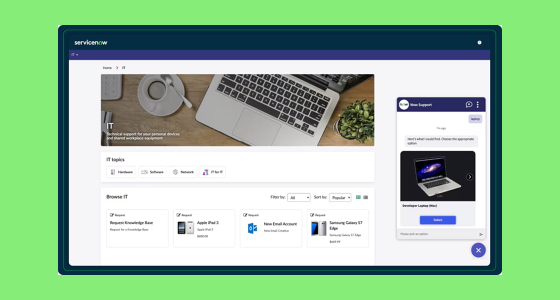
A service catalog used to be a simple menu: reset a password, request software, order a laptop. Today, it’s the front door of IT—and it directly affects employee experience, ticket volume, and how much your ITSM investment actually pays off.
In ServiceNow, the teams that get the best results treat the catalog like a product: they design it for discovery, remove friction from request forms, automate fulfillment, and connect it to the systems that do the work. Personalization, automation, and integration aren’t “advanced extras” anymore—they’re what turns self-service into real adoption.
Why a standard service catalog isn’t enough
A basic catalog can still fail if users don’t trust it. Common symptoms include:
- The catalog is cluttered and hard to search.
- Forms feel generic, long, or confusing—people abandon the request halfway.
- Requests disappear into a black hole: manual routing, slow approvals, unclear status.
- IT spends time on repetitive fulfillment instead of higher-value work.
If your goal is adoption, the catalog has to be fast, clear, and predictable—every time.
The pillars of advanced service catalog management
A high-performing ServiceNow catalog typically improves five areas:
- Findability and relevance (people can quickly find the right thing)
- Smart request design (forms that adapt and don’t waste time)
- Automation and orchestration (approvals + fulfillment are streamlined)
- Integration (HR, IAM, assets, collaboration, analytics)
- Continuous improvement (feedback + data-driven iteration)
Let’s break down what “advanced” looks like in practice.
1) Personalization: make the catalog feel built for each user
Personalization is one of the fastest ways to improve adoption because it reduces noise and confusion.
Role-based and context-based visibility
Instead of showing everyone everything, segment the experience based on:
- Role and department (for example: onboarding options for managers; developer tools for engineering)
- Location (hardware availability, regional support options, language)
- Employee lifecycle moments (new hires, transfers, offboarding)
“Less typing” forms with dynamic logic
Your form design can make or break adoption. Advanced catalogs use:
- Conditional questions that appear only when needed
- Pre-filled user data to reduce errors and speed up submissions
- Guided choices and help text so users pick the right item the first time
Recommendations and better search
Most users don’t browse—they search. Catalog success depends on:
- Strong search placement and clear naming
- Useful tags/keywords for common wording (not internal jargon)
- Smart suggestions when a search returns no results (similar services, knowledge articles, or the right request item)
2) Automation: turn requests into outcomes, not tickets that wait
Manual routing and fulfillment are the enemies of speed and scale. Automation should cover approvals, task orchestration, and system actions.
Automated approval chains (without bottlenecks)
Design approval logic that matches reality:
- Multi-stage approvals for sensitive access or high-impact changes
- Auto-escalation when approvals stall beyond a defined threshold
- Status notifications at each step so users never feel ignored
Fulfillment automation (zero-touch where possible)
High-performing catalogs trigger real work automatically, such as:
- Creating accounts and granting access after approval
- Routing tasks to the right resolver groups with complete context
- Assigning assets from inventory and triggering shipping/hand-off steps
- Updating records across systems consistently (identity, HR, asset data)
Low-code workflow building for faster iteration
The practical advantage of ServiceNow is being able to refine and scale workflows without long development cycles. Focus on:
- Reusable flow patterns for common request types
- Standard steps for approvals, tasks, and notifications
- A clear operating model so catalog owners can improve flows monthly, not yearly
3) Integration: the catalog is only as strong as the systems behind it
A service catalog becomes “advanced” when it is connected to the systems that actually deliver the service. Without integrations, “self-service” still creates manual work.
HR systems (onboarding, offboarding, role changes)
This is where automation pays off quickly:
- New hire triggers a full bundle: laptop, accounts, tools, permissions
- Role change updates access and software entitlements with the right approvals
- Offboarding triggers deprovisioning and asset return workflows
Identity and access management (IAM)
Integrations reduce manual work and improve compliance:
- Provision access only after approval
- Adjust permissions based on role changes
- Revoke access automatically during offboarding
Asset management and procurement
Make requests realistic and predictable:
- Show what’s available and what’s back-ordered
- Trigger procurement steps when stock is low
- Track lifecycle, warranty, and assignment without spreadsheets
Collaboration channels (Teams/Slack)
Meet users where they work:
- Guide requests through conversational experiences
- Push real-time updates on approvals and status changes
- Reduce “what’s the status?” messages by making progress visible
Analytics and reporting
Once integrated, you can measure and improve:
- Adoption trends by department and location
- Bottlenecks by approval step or resolver group
- High-demand services that deserve more automation or clearer design
4) Usability: the product design layer most catalogs ignore
Even the best automation won’t matter if the catalog is hard to use.
Information architecture that matches how users think
- Simple categories (hardware, software, access, support)
- Clear naming (avoid internal abbreviations)
- Short descriptions that answer “what do I get?” and “how long does it take?”
Search-first experience
Invest in:
- A prominent search bar
- Clean catalog item titles and synonyms (how users actually speak)
- Strong “no results” handling to route users to the right place
Portal experience that supports self-service
A well-designed portal removes hesitation:
- Quick access to common requests
- Clear status tracking and expectations
- Helpful content (FAQs, what-to-expect, eligibility)
5) Continuous improvement: treat the catalog like a living product
The catalog should get better every month. Build a simple improvement loop.
Capture feedback in the flow
- Short post-fulfillment surveys
- “Suggest a service” and “report an issue” options inside the catalog
- Quick feedback on request clarity and experience
Use analytics to prioritize changes
Watch for:
- Top searches with no results (catalog gaps)
- Abandonment rate (forms too long or confusing)
- Time-to-fulfill by item (automation opportunities)
- Rework rate (how often IT asks for clarification)
Operate like a product team
Apply small, frequent updates:
- Improve the top 10 catalog items first
- Standardize the most common approvals and fulfillment paths
- Iterate quarterly on structure, naming, and self-service content
Practical ServiceNow tips for advanced catalogs
- Use the right request patterns for control and speed: structured catalog items where data quality matters; guided intake where users need help choosing.
- Build reusable workflows for the most common request categories (access, hardware, onboarding, software).
- Use conversational guidance to reduce incorrect submissions and accelerate self-service.
- Customize the portal experience so users can find the right service in seconds, not minutes.
Measuring success: KPIs that prove value
Pick a small set of metrics that connect experience and operations:
- User adoption rate (active users over time)
- Self-service success rate (requests completed with minimal agent effort where appropriate)
- Time to fulfillment (by catalog item)
- User satisfaction (post-fulfillment scores)
- Request quality (rework/clarification rate)
Common pitfalls to avoid
- Over-complexity: too many categories, too much jargon, too many steps.
- Poor data hygiene: outdated roles, groups, or asset inventory breaks automation.
- One-time setup: catalogs decay fast without iteration.
- IT-only ownership: onboarding, access, and procurement need HR/security/facilities alignment.
Conclusion: the catalog is your adoption engine
Advanced service catalog management is how ITSM stops feeling like “tickets” and starts feeling like service delivery. Personalization makes the catalog easy to use, automation makes it fast and reliable, and integration makes it real.
If you want to take your ServiceNow catalog beyond the basics, start with a pilot:
- Choose one department or workflow (like onboarding or access requests)
- Improve the UX, automate fulfillment, connect the needed systems
- Measure results, refine, then scale
Want help designing an advanced ServiceNow service catalog that users actually adopt? Contact us!