How to Use monday.com Workload View to Prevent Burnout and Optimize Resource Management

How to Use monday.com Workload View to Prevent Burnout and Optimize Resource Management

In the digital age, managing a productive and happy team is more challenging than ever. Project managers and business leaders are constantly at the crossroads of maximizing output while safeguarding employee wellbeing. As organizations embrace remote and hybrid work, maintaining a 360-degree view of everyone’s workload is critical. Fortunately, platforms like monday.com have evolved with features specifically designed to tackle these challenges. The monday.com workload view is a powerful tool to prevent team burnout, enhance resource management, and boost employee morale.

Understanding the Challenges of Modern Resource Management

Every successful project hinges on the delicate balance between ambition and sustainable productivity. However, when resource allocation isn’t tracked effectively, teams can quickly become overwhelmed, scatter their efforts, or feel disconnected from their mission. This can result in:

  • Unintentional overload on high-performing team members
  • Team burnout and decreased motivation
  • Underused resources and idle capacity
  • Missed deadlines or compromised project quality
  • Low job satisfaction and potentially higher turnover

Resource management, therefore, must be proactive and data-driven. The stakes are high: not only is productivity on the line, but so is your team’s wellbeing and long-term morale.

Introducing monday.com’s Workload View

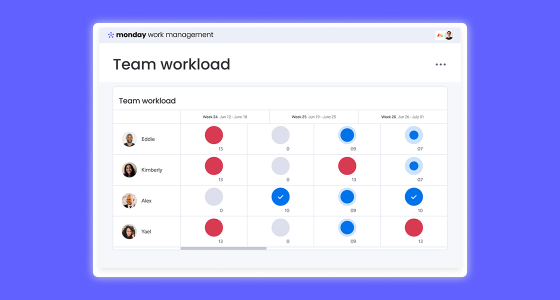
monday.com’s workload view is purpose-built for this new era of work. It delivers a visual, real-time overview of everyone’s assigned tasks and responsibilities. With just a glance, leaders can see who is overloaded and who might have the capacity to take on more work. Instead of relying on guesswork or endless check-ins, you gain actionable insights that help you distribute work intelligently across your team.

This view transforms the way project managers operate by offering:

  • Centralized, up-to-date resource allocation
  • A dynamic timeline of workloads across projects and timeframes
  • Immediate identification of at-risk employees or bottlenecks
  • Drag-and-drop interface for seamless workload adjustments

Coupled with best practices, the workload view can be your team’s safeguard against burnout and a catalyst for improved productivity and satisfaction.

The Link Between Workload, Burnout, and Morale

Before diving further into how to use the tool, let’s briefly address why workload balance is so critical:

  • Burnout Prevention: Employees who consistently work beyond their capacity are more likely to disengage, make errors, or ultimately leave your organization.
  • Employee Morale: When workers perceive that their time and strengths are respected, their job satisfaction increases. A well-balanced workload fosters a sense of accomplishment and belonging.
  • Optimized Productivity: Teams with the right amount of work can focus, produce quality results, and drive the business forward efficiently.

In short, using monday.com workload view not only enables smart resource management but also supports the human side of team leadership.

Best Practices for Tracking Resource Allocation

Implementing a tool is just the first step; to see true impact, you need to embed strong habits and best practices into your project culture.

1. Keep Data Accurate and Up-to-date

Encourage team members to keep their boards updated. If task durations or timelines change, make sure these are promptly reflected in the system. Set up reminders for project leads to validate data weekly or at each sprint planning session.

2. Define Effort Levels Clearly

Ambiguity in effort estimation can skew your workload data. Establish a standard meaning for units of effort (e.g., “1” always equals 1 working hour) and ensure everyone estimates similarly. If you use story points or another agile approach, standardize what each value represents.

3. Monitor Workloads Regularly

Check the monday.com workload view frequently—ideally as part of your daily standup or weekly planning. Early detection of overload means you can redistribute work before it becomes a problem.

4. Involve Your Team

Resource management shouldn’t be top-down only. Invite team members to share if they are feeling spread thin or under-challenged. Leverage their feedback to adjust allocations in real time.

5. Look for Trends, Not Just Spikes

It’s natural for workloads to fluctuate with project cycles. However, if certain individuals or roles are routinely in the red, it may be a sign of deeper resource gaps. Use historical data to spot trends and plan accordingly.

Leveraging Insights from Workload View for Smarter Resource Management

The workload view’s true potential lies in turning insight into action. Here’s how you can leverage the metrics and visual cues it offers:

  • Proactive Assignment: Assign new tasks to those with the most available capacity, preventing future bottlenecks.
  • Redistribution of Work: When someone’s workload turns red, move tasks to colleagues with more realistic availability. Use monday.com’s drag-and-drop features for quick adjustments.
  • Capacity Planning: Before launching a new project or sprint, use the workload view to ensure no one’s schedule is maxed out.
  • Time-Off Management: Account for vacations, sick days, or public holidays directly in your workload planning to avoid unpleasant surprises.
  • Long-term Resource Decisions: Consistently overloaded teams may be a sign that you need to hire or re-skill for peak periods. Let your data inform those strategic choices.

Ultimately, the workload view empowers project managers to shift from reactive firefighting to proactive leadership.

Preventing Team Burnout: Signs to Watch For

No tool alone can guarantee a burnout-free environment, but combining monday.com’s features with attentive leadership greatly reduces the risk. Some common warning signs to monitor include:

  • Consistent overload (red status) for one or more team members
  • Tasks being repeatedly reassigned due to missed deadlines
  • Noticeable drop in communication or morale
  • Lower work quality or creativity
  • Increase in sick days or unexplained absences

When these patterns emerge, pause to reassess allocations or have one-on-one check-ins with impacted individuals. Prevention is always less expensive than cure when it comes to employee engagement and wellness.

Boosting Employee Morale and Enhancing Collaboration

Beyond avoiding overload, the monday.com workload view can be a tool for empowerment and motivation:

  • Transparent Planning: Give everyone visibility into their own—and their peers’—projects. Transparency fosters trust and clarifies expectations.
  • Skill-based Assignments: When tasks are distributed based on both availability and expertise, employees are more likely to feel valued and supported.
  • Opportunities for Growth: Identify times when team members can take on stretch assignments or lead new initiatives, especially when their workload allows for it.
  • Celebrating Wins: Use a balanced workload to complete projects more efficiently, creating space to recognize achievements and celebrate milestones as a team.

These factors collectively boost both morale and the overall work culture, making your team more resilient and engaged over time.

Optimizing Productivity without Overstretching Teams

High-performing teams don’t just work harder—they work smarter. By leveraging resource management with tools like monday.com workload view, you can:

  • Set realistic deadlines based on real capacity, not guesswork
  • Prioritize high-value tasks for each contributor
  • Reduce context switching and “busywork”
  • Allow for buffer time in schedules, so emergencies don’t derail progress
  • Construct repeatable processes for ongoing workload reviews

Teams that feel their time is used wisely and their contributions matter are not only more productive but also more likely to deliver innovative and high-quality outcomes.

Advanced Tips to Get the Most from monday.com’s Workload View

Once you’re comfortable with the basics, consider these advanced strategies to maximize the value of monday.com workload view:

  • Custom Dashboards: Integrate workload data into company-wide dashboards for visibility among executives and stakeholders.
  • Automations: Set up automated alerts for when an employee’s weekly workload exceeds a threshold. This prompts immediate review and reallocation before issues arise.
  • Multiple Boards, Single View: Use cross-board views if your team juggles several projects. Keep all resource usage centralized, even across departments.
  • Integrate Time Tracking: Combine estimated effort with actual time spent using integrations (like monday.com’s native time tracking or third-party apps) to refine future planning and improve estimation accuracy.
  • Workflow Automation: Automatically notify team members when expectations change or new tasks land in their queue, reducing miscommunication.
  • Analytics and Reporting: Regularly export and review historical workload data to inform quarterly reviews or future hiring needs.

Common Pitfalls to Avoid with Workload Management

Even with robust tools, resource management can go awry. Watch out for these common mistakes:

  • Ignoring long-term trends and focusing only on short-term crises
  • Assuming all team members can take on the same workload (remember to account for learning curves, part-time schedules, and varying skill levels)
  • Failing to accurately estimate task durations or ignoring dependencies
  • Letting resource allocation become too rigid—allow room for creativity, professional growth, and flexibility
  • Over-reliance on software. Human connection, regular check-ins, and emotional intelligence remain critical to team health

Stay mindful of these pitfalls, and use the workload view as a supporting system—not a replacement—for thoughtful leadership.

Real-World Impact: Case Example

Consider a mid-sized marketing team struggling with uneven workloads. Prior to using monday.com workload view, top performers were regularly burning out, while others had bandwidth to spare. Deadlines were missed, and morale slipped.

With a single implementation:

  • Resource allocation became transparent, exposing chronic over-assignment to key individuals
  • Tasks were redistributed, giving opportunities to less-utilized team members
  • Productivity improved as projects flowed more evenly through the pipeline
  • Employee retention increased, while overall job satisfaction hit record highs in company surveys

This story is just one of countless organizations finding success by blending technology with intentional leadership and communication.

Next Steps: Unlock Your Team’s Potential

Balancing workload is not just a managerial duty—it’s a pillar of organizational health. With monday.com’s workload view, you have the power to transform your approach to resource management:

  • Proactively prevent team burnout by identifying and addressing imbalances before they escalate
  • Boost employee morale through visibility, fairness, and opportunities for growth
  • Optimize productivity by assigning the right work to the right people at the right time

Start by implementing the strategies outlined above and foster a culture centered on transparency and wellbeing. Your projects, your people, and your bottom line will thank you.

Ready to see how the monday.com workload view can revolutionize your project management processes? Contact Us and schedule a demo to explore how you can unlock your team’s true potential today.


Read more