Introduction: The Transformation of IT Service Delivery
The way organizations deliver IT services has fundamentally changed. Traditional service desks, bogged down by repetitive requests and manual processes, are making way for agile, automated solutions that prioritize end user empowerment and operational efficiency. At the heart of this evolution lies the automated service catalog; a dynamic engine for delivering self-service IT experiences through platforms like ServiceNow and leading ITSM solutions. By embracing platfoms like ServiceNow, organizations can dramatically reduce IT support workload while giving employees the on-demand, consumer-like experiences they expect. This article explores best practices for designing, implementing, and optimizing an automated service catalog that elevates satisfaction for end users and IT teams alike.
Understanding the Automated Service Catalog in Modern ITSM
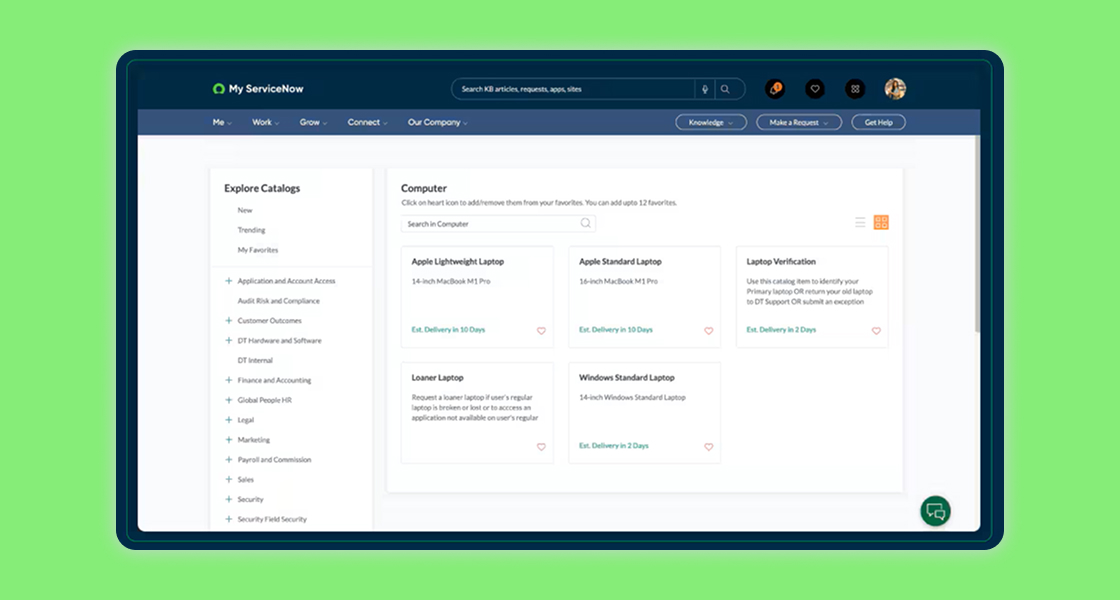
An automated service catalog is a curated, digital storefront where users can request IT (and sometimes business) services—ranging from password resets to hardware provisioning to software access—without waiting on manual intervention. Unlike static catalogs of the past, today’s catalogs are integrated with backend automation, workflow engines, and approval chains.
- Automation first: Requests trigger automatic workflows and fulfillment actions, reducing manual bottlenecks.
- Centralized access: All services, knowledge bases, and status updates in one portal.
- Personalized experience: Catalogs adapt content and visibility based on user roles, location, or department.
- Consistent SLAs: Automated routing ensures requests are handled within defined service level agreements.
These capabilities, when properly implemented and continuously optimized, empower end users to get what they need, when they need it—no lengthy service desk queues or frustrating ticket status updates required.
Why Empower End Users with Self-Service?
User expectations have shifted dramatically. Employees now expect their workplace IT to mirror the convenience and autonomy of their favorite consumer apps. Empowering end users through a well-designed portals and automated service catalog delivers tangible business benefits:
- Reduced IT support workload: Automated fulfillment of common requests frees up service desk agents for more strategic work.
- Faster issue resolution: Self-service cuts request wait times from days or hours to minutes or seconds.
- Greater user satisfaction: Autonomy and transparency reduce frustration and boost overall digital employee experience.
- Lower operational cost: Fewer tickets and manual tasks translate into significant cost savings over time.
- Improved policy adherence: Automated controls ensure requests comply with security, compliance, and approval requirements.
Ultimately, automating the service catalog isn’t just about efficiency—it’s about fostering a culture where IT is seen as an enabler, not a bottleneck.
Designing a Self-Service Portal That Users Love
Success begins with the end user experience. Designing an engaging self-service environment goes beyond technical configuration; it’s about understanding user needs, business workflows, and IT capabilities. Here are key best practices for building a portal that delivers real business value:
1. Map and Prioritize High-Value Services
Start by cataloging and analyzing the most frequent, impactful, and time-consuming requests submitted to your service desk. Focus initial automation on these “quick win” areas:
- Password resets and account unlocks
- Software installation/upgrade requests
- Hardware procurement or replacement (laptop, monitor, accessories)
- Access management (file shares, applications, remote access)
- Employee onboarding/offboarding
- General inquiries and knowledge articles access
This targeted approach delivers fast ROI and demonstrates the value of self-service to both IT and the broader business.
2. Optimize for Simplicity and Intuitiveness
Cluttered, jargon-heavy portals deter adoption. Apply user-centric design principles:
- Group related services logically with clear headings.
- Use business-friendly language—avoid technical acronyms or IT jargon.
- Limit form fields to only what’s necessary; use dynamic fields to streamline entry.
- Leverage icons, tooltips, and quick-start guides for visual clarity.
- Implement robust search and filtering options so users quickly find what they need.
3. Harness Personalization and Smart Recommendations
Increase relevance and engagement by tailoring the catalog experience:
- Show or hide catalog items based on user role, location, or business unit.
- Recommend services based on historical user requests.
- Leverage AI-driven chatbots for guidance and “next best action” to help users self-diagnose issues before submitting requests.
4. Integrate Knowledge Management
An effective service catalog is deeply connected with up-to-date knowledge articles:
- Suggest self-help documentation during the request process to deflect tickets.
- Surface “did you mean?” content for ambiguous or non-catalog terms in search.
- Allow users to provide feedback or rate knowledge articles to continuously improve accuracy.
5. Embed Automation and Approvals
Self-service delivers the most value when it automates fulfillment end-to-end:
- Integrate with back-end systems (Active Directory, asset management, HRIS, cloud platforms) for real-time provisioning or deprovisioning.
- Automate multi-step approval workflows, routing requests to the right stakeholders.
- Trigger notifications, status updates, and service request tracking directly from the portal.
6. Provide Transparent Status and Feedback
Empowered users feel in control. The portal should give real-time updates:
- Display the stage of each request (submitted, in progress, completed).
- Provide estimated completion times or SLA targets.
- Allow users to comment, attach additional details, or close tickets themselves if needs are resolved early.
Implementing Automated Service Catalogs: Step-by-Step
Transforming your catalog into a powerful engine for self-service requires careful planning and cross-functional collaboration. Here is a roadmap for successful implementation on ServiceNow or any leading ITSM platform:
- Align IT, business units, and key user groups on objectives, pain points, and success metrics. Secure executive sponsorship to drive adoption and change management.
- Audit existing services and evaluate which requests are standardized, repetitive, or suitable for automation. Identify quick wins and critical gaps.
- Define categories, naming conventions, and service descriptions with the end user in mind. Develop a scalable catalog structure that can be easily maintained and expanded.
- Use the ITSM platform’s automation tools to map out fulfillment processes, integrate approval chains, and connect with third-party systems for end-to-end delivery.
- Develop or curate high-quality knowledge articles to support service requests and empower self-resolution at every step.
- Build and test the user interface, leveraging feedback from pilot users. Optimize search, layout, and available services based on real user journeys.
- Establish access controls, audit trails, and approval hierarchies to satisfy policy and regulatory requirements.
- Provide engaging onboarding materials, walkthroughs, and training for employees, managers, and IT agents. Continuously communicate new features and service availability.
- Monitor usage analytics, gather user feedback, and iterate. Use real-world data to address bottlenecks, remove low-value catalog items, and expand automation to new areas over time.
This systematic approach not only accelerates time-to-value, but also minimizes resistance as users and IT professionals adapt to the new, automated paradigm.
ITSM Automation in Practice: Examples that Reduce IT Support Workload
What does an automated service catalog look like in action? Here are real-world scenarios that illustrate how ITSM automation and a well-executed ServiceNow self-service portal can radically reduce IT support workload while driving end user empowerment:
- Automated Password Resets: Instead of submitting a ticket or calling the helpdesk, users can reset or unlock their accounts instantly by verifying identity through a self-service portal integrated with Active Directory and MFA.
- On-Demand Software Distribution: Employees request applications from a centrally managed catalog; automated workflows verify licensing and deploy the software without IT agent intervention.
- Automated Access Provisioning: New hires are granted access to required systems and applications based on role templates. Approvals are handled digitally, and fulfillment is triggered automatically in downstream systems.
- Self-Service Hardware Ordering: Employees choose from pre-approved devices or accessories. Catalog automation checks for eligibility, routes requests for manager approval, and notifies procurement or lockers for pick-up.
- Knowledge-Driven Incident Prevention: AI-driven chatbots recommend relevant knowledge articles or troubleshooting steps—even helping users resolve issues before a formal request is ever logged.
The impact of automation at scale is dramatic: leading IT organizations report reductions in ticket volumes by up to 50%, acceleration of time-to-resolution, and major boosts in user satisfaction scores.
Measuring Success: KPIs for the Automated Service Catalog
Measuring and optimizing your service catalog isn’t just a one-time task. Use these key performance indicators (KPIs) to ensure your investment is returning real business value:
- Self-Service Adoption Rate: Percentage of users regularly interacting with the portal, versus submitting requests via email or phone.
- Automation Rate: Proportion of catalog requests fulfilled end-to-end through automation.
- Ticket Volume Reduction: Decrease in low-value or repetitive tickets received by IT support teams.
- Fulfillment Time/SLA Achievement: Average time to resolution and compliance with documented service-level agreements for catalog items.
- User Satisfaction: CSAT scores, feedback, and user ratings following service fulfillment.
- Cost Per Ticket: Quantifiable reduction in support costs as automation increases.
- Knowledge Article Use: Frequency of knowledge article views and ticket deflection due to successful self-resolution.
Make these metrics highly visible and revisit them regularly. Use insights to drive continuous refinement—adding new automation, pruning unused services, or revisiting design elements to better match evolving user needs.
Overcoming Common Challenges in Self-Service Portal Adoption
Transitioning to automated self-service is transformative, but not without roadblocks. Proactively address these common challenges to maximize adoption and long-term success:
- Insufficient User Awareness: Go beyond launch emails—promote the portal in onboarding, company meetings, digital signage, and recurring communications.
- Poor User Experience (UX): Regularly survey users, conduct usability testing, and prioritize enhancements to navigation and accessibility.
- Resistance to Change: Engage influential employees and business stakeholders as champions; highlight success stories and tangible time savings.
- Lack of Integration: Ensure the automated service catalog connects seamlessly with backend IT, HR, and business systems for true end-to-end automation.
- Stale Content or Outdated Services: Assign catalog owners to review, update, and retire services regularly based on analytics and feedback.
The organizations that see the greatest success treat the self-service portal as a living, evolving product—one that is actively managed, marketed, and improved over time.
Future Trends: The Evolving Role of Automated Service Catalogs
As technology and business needs rapidly change, so too does the role of the service catalog in ITSM automation and user empowerment. Key trends to watch out for include:
- AI-Powered Service Delivery: Machine learning models predict user needs, recommend services, and proactively resolve incidents or requests.
- Conversational Interfaces: Integration of chatbots and voice assistant technologies for natural language request submission and fulfillment tracking.
- Enterprise-Wide Expansion: Extending self-service beyond IT—HR, facilities, finance, and other business units leverage the same portal model for employee empowerment.
- Mobile-First Experiences: Responsive, app-based catalogs for a truly anytime/anywhere self-service experience.
- Hyper-Automation: Combining RPA (Robotic Process Automation), workflow automation, and low-code platforms for more complex, cross-departmental service orchestration.
By steadily investing in these innovations and maintaining close alignment with business priorities, IT leaders can future-proof their service desk and maximize the value of automation for years to come.
Conclusion: Realizing the Value of Automated Service Catalogs
The path to self-service success is clear: organizations that embrace automated service catalogs and ITSM automation, especially through platforms like ServiceNow, unlock dramatic gains in end user empowerment, IT support efficiency, and overall business agility. By following service catalog best practices—mapping high-impact services, designing for user experience, embedding automation, and measuring results—IT can transform its role from cost center to innovation driver.
Are you ready to elevate your self-service strategy, reduce IT support workload, and deliver digital experiences your employees love? Contact Us!