ServiceNow Employee Center: One Portal for the Employee Experience
August 28, 2026
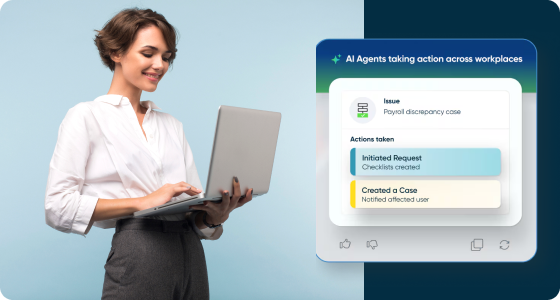
Most employees do not experience a company through its org chart. They experience it through the moment they need something: a password reset, a benefits question, a new laptop, a policy clarification, time off approval. In a lot of organizations, each of those moments lives in a different system, with a different login, a different look, and a different response time. IT has a portal. HR has a portal, or a shared inbox, or both. Facilities runs on email. Legal runs on whoever picks up the phone.
That fragmentation is not just an inconvenience. It is a measurable drag on productivity, adoption, and employee sentiment, and it becomes more visible as hybrid and distributed work make "just walk over and ask" no longer an option. ServiceNow's answer to that fragmentation is Employee Center: a single, role-aware portal that consolidates HR, IT, facilities, legal, and other departmental services into one experience.
This article looks at what Employee Center actually does, why the underlying problem is bigger than most teams assume, what a rollout looks like in practice, and how organizations in Latin America and the Caribbean specifically should think about the business case.
Employee Center is a unified, multi-department self-service portal built on the ServiceNow platform. Instead of employees bouncing between an ITSM ticketing tool, an HR system of record, a facilities request form, and a legal intake email, Employee Center gives them one place to search for answers, browse a shared services catalog, submit requests, and track the status of anything they have asked for, regardless of which back-end department actually fulfills it.
The portal sits on top of ServiceNow's existing workflow engine, so departments keep their own processes and approval chains behind the scenes. What changes is the front door: employees no longer need to know which team owns a given request, or which system that team happens to use. They ask once, in plain language, and the request gets routed correctly.
The cost of a fragmented employee support model rarely shows up as a single line item, which is part of why it persists. It shows up as small frictions repeated thousands of times a week.
None of this is specific to any one vendor or platform. It is the natural result of departments each optimizing their own systems independently, over years, without a shared front door for the people those systems are meant to serve. Understanding that root cause matters, because it is what determines whether a new portal actually solves the problem or just adds a fifth system to the four that already exist.
A consolidated portal only helps if employees can actually find what they need inside it faster than they could before. Employee Center's design choices are built around that specific bar.
Employee Center is built around a configurable taxonomy that organizes content and services by department, role, location, or employee type, rather than forcing every employee to browse the same undifferentiated menu. A frontline retail employee and a corporate finance manager see different service catalogs, different knowledge articles, and different quick links, because their needs are genuinely different. Getting this taxonomy right is one of the more involved parts of a rollout, and it is where most of the strategic thinking in a deployment actually happens, more so than the technical configuration itself.
Rather than employees needing to know the exact name of a form or the right department to file under, Employee Center's search is built to understand natural-language questions and surface the right knowledge article, service item, or open request. Paired with a virtual agent, a large share of common requests, password resets, policy lookups, time-off balance checks, can be resolved without a live agent ever getting involved. Organizations that have published results from mature Employee Center deployments report search deflection rates in the range of 90 percent for their most common request categories, which translates directly into support team capacity freed up for harder problems.
Every department's services, HR benefits enrollment, IT equipment requests, facilities work orders, legal document requests, live in one searchable catalog with a consistent submission and tracking experience. Employees do not need to learn five different interfaces or remember which team uses which tool. They submit a request the same way regardless of what it is for, and they can track every open item, across every department, from one dashboard.
For larger organizations, Pro adds targeted campaigns and announcements that can be scoped by department, location, or role, deeper analytics on what employees are searching for and where they are getting stuck, and more advanced configuration options for the taxonomy itself. This tier tends to make the most sense for organizations already running ServiceNow across multiple departments, since the added value comes from orchestrating complexity that already exists, not from creating complexity that was not there before.
For organizations that have already invested in ServiceNow for IT service management, Employee Center is less of a new platform and more of a new front door on top of infrastructure that already exists. This matters more than it might sound, because it directly affects both the cost and the risk profile of a rollout.
A ServiceNow instance with a mature configuration management database already has structured data about assets, services, and dependencies that Employee Center can draw on to route and contextualize requests correctly.
An organization that has already worked through the fundamentals of moving ITSM beyond simple ticketing tends to have workflow and approval logic in place that Employee Center can surface through a friendlier front end, rather than needing to build that logic from scratch. In practice, this means IT-mature organizations often see a faster path to a working Employee Center pilot than organizations starting their ServiceNow journey from zero, since a meaningful share of the underlying plumbing is already there.
The inverse is also true. Organizations evaluating Employee Center as their first real ServiceNow deployment should expect the early phase of the project to include more foundational work: setting up the service catalog structure, defining basic workflow routing, and establishing the data model that later phases, including HR and facilities modules, will build on.
That is not a reason to avoid starting, but it is a reason to scope a first deployment realistically rather than trying to unify every department in a single release.
It is worth being direct about the alternative most organizations are actually comparing this against, which is rarely "no portal at all." It is usually a legacy intranet, a patchwork of SharePoint sites, or several disconnected departmental tools that grew up independently over time.
The practical differences tend to show up in three places. First, discoverability: a legacy intranet is organized the way the IT or communications team that built it thought about the company, not the way employees actually think about their own questions. Second, ownership: when five departments each maintain their own site or tool, none of them are accountable for the employee's overall experience, only for their own slice of it. Third, measurement: fragmented systems rarely share a common way to measure adoption, deflection, or satisfaction, which makes it difficult to know whether the support model is actually working or just quietly generating frustration nobody has quantified yet.
None of this is an argument that every organization needs to rip out every existing system. Employee Center is explicitly designed to sit on top of and orchestrate departmental workflows rather than replace them outright, which is part of why organizations that have already invested in ServiceNow for IT often find the incremental step to a broader Employee Center rollout more approachable than starting a unification project from scratch.
Organizations that get real value from Employee Center tend to follow a similar sequence, even when the specific departments and timelines differ.
This is also the point where an experienced implementation partner earns its keep, not because the platform itself is impossibly complex, but because the sequencing and taxonomy decisions above are easy to get wrong on a first attempt, and expensive to correct once employees have already formed habits around a flawed structure.
Most Employee Center deployments that stall or underperform do not fail because of the platform. They fail because of a handful of predictable, avoidable decisions made early in the project.
Employee Center's return on investment shows up in a few consistent categories across organizations that have published results from mature deployments.
The strongest business cases tend to tie these metrics back to a concrete starting baseline from the audit step above: how many tickets were misrouted last quarter, how long the average HR question took to resolve, how many separate systems an average employee had to know about just to do their job. Without that baseline, it is much harder to demonstrate the improvement later.
A portal that unifies HR, IT, facilities, and legal in one place is also a portal that touches sensitive employee data across all of those domains, which makes access governance a design requirement rather than an afterthought.
Role-based access needs to be enforced consistently, so that a facilities request does not accidentally expose HR compensation data, and so that content genuinely intended for managers is not visible to their direct reports. This is closely tied to the taxonomy work described earlier: the same structure that determines what content an employee sees also needs to determine what data they can access through the requests they submit. Getting this wrong is not just a UX problem, it is a data governance and, in some jurisdictions, a regulatory one.
Audit trails matter as well. Because Employee Center orchestrates requests across departments that each have their own compliance obligations, being able to show who requested what, who approved it, and when, is often a requirement HR and legal teams bring to the table independently of whatever IT was originally planning for the rollout. Building this in from the start is considerably easier than retrofitting it once the portal is already handling live requests across the organization.
ServiceNow's platform is genuinely capable of supporting the kind of unified employee experience described above, but the platform's flexibility is also exactly why so many rollouts stall on taxonomy design, department prioritization, or change management rather than on technical configuration.
Those are organizational and strategic decisions, not licensing decisions, and getting them right the first time is what separates an Employee Center deployment that employees actually adopt from one that becomes yet another underused portal.
GB Advisors works with organizations across Latin America and the Caribbean on exactly this kind of rollout: auditing the current state of employee support, designing a taxonomy that reflects how the organization actually operates across countries and roles, and sequencing a phased deployment that builds adoption department by department rather than asking employees to relearn everything at once.
If your organization is evaluating how to bring HR, IT, facilities, and other departmental support into one coherent employee experience, talk to GB Advisors about what a phased Employee Center rollout could look like for your specific structure and regional footprint.
No. Employee Center sits on top of existing department workflows and systems, acting as a unified front end rather than a replacement for HR or IT systems of record. Departments generally keep their own back-end processes; what changes is how employees access and track them.
It is not a strict requirement, but organizations with an existing ServiceNow ITSM footprint tend to have a faster path to a working deployment, since foundational elements like the service catalog structure and workflow routing are often already in place.
Timelines vary widely based on how many departments are being unified and how much taxonomy and content work is required, but a phased approach, starting with one or two departments and expanding from there, is the pattern most organizations follow rather than attempting a single, all-at-once launch.
The core problem it solves, fragmented support across departments, affects organizations of many sizes, though the scale of the taxonomy and content work naturally scales with organizational complexity. Mid-size, multi-country organizations in Latin America and the Caribbean are often a good fit precisely because of the regional and departmental fragmentation described earlier in this article.