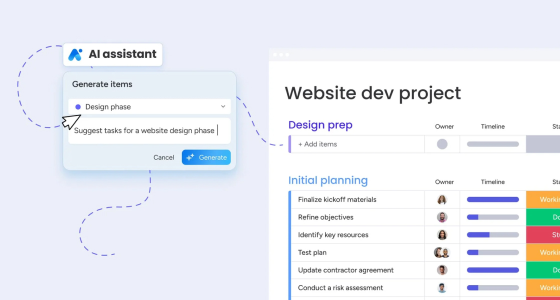
Project management used to be about tracking tasks and chasing updates. Today, it’s about keeping work moving with fewer handoffs, clearer priorities, and less time spent on admin. That’s where monday.com’s AI capabilities stand out: they’re built into the platform so teams can set up workflows faster, reduce busywork, and make decisions with better context—without turning project management into a science experiment.
The rise of AI in project management
AI matters in project management for a simple reason: teams are juggling more work, across more tools, with less time to coordinate. That creates predictable pain points:
- People lose time on repetitive updates (status checks, reminders, reassignments)
- Plans drift because risks show up late
- Leaders want clarity without building reports from scratch
- Hybrid teams need alignment without more meetings
Done right, AI helps by speeding up setup, spotting issues earlier, and turning scattered data into usable direction.
What “monday AI” actually looks like in day-to-day work
monday.com positions AI as help that’s embedded in your workflow—so you can think, create, and take action without leaving the platform.
Here are the parts that are most relevant for project and operations teams.
1) Faster setup with monday magic (from prompt to ready-to-use workspace)
If you’ve ever started from a blank board and thought “there has to be a faster way,” monday magic is built for that. You describe what you need, and it generates a usable workspace—boards, structure, and building blocks—so your team can start working instead of configuring.
Where it helps most:
- New teams rolling out a process for the first time
- Departments that need structure fast (Ops, HR, Marketing, PMO)
- Anyone tired of hunting templates and customizing them for hours
The impact is immediate: less setup time, fewer missing pieces, and a faster path from “idea” to “execution.”
2) Custom apps without coding: monday vibe (build tools your team actually needs)
Projects rarely fail inside the plan. They fail around the edges—intake, approvals, reporting, stakeholder updates, and all the side conversations that don’t live in your board.
monday vibe changes that. It’s an AI-powered no-code builder that turns a written prompt into a secure custom app that runs on the monday.com platform. In plain English: you can describe what you want (a campaign tracker, an intake portal, a resource request app), and vibe helps you build it without relying on engineering time.
Why this matters for project management:
- You can create lightweight apps around your workflow so the process feels complete, not stitched together
- You can standardize the way work enters the system, which protects priorities and timelines
- You can give stakeholders a simple “front door” to request, review, or track progress
Practical examples:
- A project intake portal that routes requests into the right board with the right fields
- A stakeholder status page that stays updated automatically as work moves forward
- A resource request app that standardizes capacity planning inputs so allocation is less reactive
3) Getting help inside the platform: monday sidekick
A big chunk of project work is searching, summarizing, and updating. monday sidekick is designed to reduce that overhead by helping teams interact with boards more naturally—so the platform can do more of the “busywork” and people can focus on decisions.
Think of sidekick as the “help me do this faster” layer:
- Pull quick summaries of what changed
- Surface what’s overdue or blocked
- Help update items based on notes or recent activity
The exact capabilities can vary by account, but the goal stays the same: faster visibility, fewer manual steps, and less time spent hunting for information.
4) Better communication with less effort (docs, updates, and summaries)
A lot of project management is communication: briefs, meeting notes, weekly updates, and the constant need to align stakeholders. AI can help teams draft and structure this content faster—especially inside docs and written updates—so you spend less time starting from scratch and more time refining the message.
Where AI creates the biggest advantage
AI isn’t valuable because it sounds modern. It’s valuable when it removes friction in the parts of project work that slow teams down.
Less manual coordination
Fewer “just checking in” messages. Fewer status meetings that could have been a dashboard.
Earlier visibility into risk
Issues show up as patterns—delays, overload, stalled handoffs—before they become emergencies.
Faster iteration
When it’s easier to set up workflows (and easier to build the small apps around them), teams adapt faster without restarting every quarter.
Real-world use cases
Marketing teams: move faster without losing control
Marketing is high-volume and high-context: every request needs the “why,” the audience, the channel, and the deadline. The problem is that requests arrive in different formats (Slack, email, hallway asks), priorities shift weekly, and approvals can become a bottleneck.
How AI helps in a monday.com workflow
- Standardized intake that actually gets used: Instead of “send me the details,” you create one intake flow that asks for the right inputs (campaign goal, audience, offer, budget, channels, due date, assets needed). AI can help draft the intake form copy, generate a brief template, and reduce vague requests.
- Auto-structured briefs and work plans: Once a request comes in, AI can turn it into a clean brief + a first-pass task list (copy, design, landing page, tracking, QA, launch, post-launch report). This is where monday magic helps teams avoid starting from a blank board every time.
- Approvals that don’t stall launches: You can set approval stages (Draft → Review → Legal/Brand → Final) and use AI-assisted summaries so reviewers see “what changed” without rereading everything. Less back-and-forth, fewer missed details.
- Faster weekly prioritization: If the team runs weekly planning, AI summaries help translate board activity into a quick “what shipped / what’s blocked / what needs a decision” view—so the meeting is decision-based, not status-based.
- Stakeholder alignment without extra meetings: A stakeholder view (or a lightweight app experience built with monday vibe) can show campaign status, deadlines, and approval needs in plain language, so leadership isn’t asking for updates mid-week.
Example workflow in practice
- Request submitted → routed to the right team/board
- AI generates a brief + task checklist → owner reviews and adjusts
- Tasks assigned based on capacity and timelines
- Approval stages enforced → AI summaries highlight changes
- Launch checklist + post-launch report template generated automatically
Product and engineering: reduce “invisible work” and unblock faster
Product and engineering teams often don’t struggle with planning—they struggle with fragmentation: roadmap items in one place, sprint work in another, dependencies in people’s heads, and status updates scattered across channels.
How AI helps in a monday.com workflow
- Faster project setup for launches and initiatives: For a feature launch or a cross-team initiative, monday magic can generate a ready-to-run structure: milestones, dependencies, owners, and status checkpoints. Your team starts with a framework instead of reinventing one.
- Cleaner cross-team visibility: AI-assisted summaries can translate technical progress into stakeholder-ready updates. That reduces the “PM as translator” burden and keeps leadership aligned without manual reporting.
- Early detection of blockers and risk patterns: When work is structured well (clear statuses, owners, due dates), it becomes easier to spot risks early: tasks stuck in “In progress,” repeated due-date changes, or dependencies that are unresolved.
- Better dependency management: AI doesn’t replace engineering judgment, but it can help highlight where dependencies are causing slowdowns (handoffs between design → dev → QA → release) and where work keeps piling up.
- Release readiness without chaos: AI-generated checklists for QA, documentation, enablement, and rollout reduce “last-minute scramble” work that teams always underestimate.
Example workflow in practice
- New initiative created → AI generates board structure + milestones
- Dependencies tagged → owners confirm feasibility
- Weekly summary generated → sent to stakeholders
- Risks flagged based on delays/workload → PM escalates decisions earlier
- Release checklist + enablement tasks created automatically
Sales operations: fix pipeline hygiene and keep leadership reporting trustworthy
Sales ops is constantly balancing process and reality. Deals move fast, reps update late, fields are inconsistent, and leadership wants reports that reflect what’s actually happening.
How AI helps in a monday.com workflow
- Standardized fields and stage rules: Clear required fields per stage (next step, close date, deal value, decision maker, risk level). When the system enforces consistency, reports stop breaking.
- Cleaner handoffs between SDR → AE → CS: AI summaries can capture context from notes, calls, and updates so deals don’t lose momentum during transitions.
- Spot stalled deals earlier: When updates haven’t changed, close dates keep slipping, or next steps are missing, it’s easier to surface “at-risk” deals and drive action.
- Weekly leadership updates without manual cleanup: Instead of building a deck every Friday, AI-generated summaries can produce a pipeline narrative: what moved, what’s stuck, what needs a decision.
- Forecasting support (with less guesswork): You still need human judgment—but with structured data, teams can spot patterns earlier (deal aging, stage conversion issues, rep workload imbalances).
Example workflow in practice
- Deals entered with required fields → stage progress rules enforced
- AI summaries capture deal context → reduces “what’s the story here?”
- Stalled deals flagged → sales leaders intervene earlier
- Weekly pipeline summary auto-generated → faster forecasting conversations
What’s next for project management
The intersection of AI and project management is only getting deeper. The most practical shift isn’t that AI “takes over”: It’s that project systems become more proactive.
- Workflows are easier to build and adjust
- Updates and insights become easier to generate and share
- Teams spend less time coordinating and more time executing
For most organizations, the best next step is simple: start with one workflow that matters, structure it properly, then add AI where it removes real friction (setup, intake, updates, reporting, and stakeholder visibility).
Start your AI-powered journey with monday.com
If you’re exploring monday.com AI, don’t start by asking “what can AI do?” Start with: where does our process slow down every week?
Then match the tool to the problem:
- Need a workflow fast? Use monday magic to accelerate setup.
- Need a custom portal or lightweight app without coding? Use monday vibe.
- Need faster visibility and less manual updating? Use monday sidekick and AI-assisted summaries.
The goal is simple: fewer bottlenecks, clearer priorities, and a workflow that supports how your team actually works!
If you want to reduce manual follow-ups, speed up execution, and build workflows that actually stick, we can help you design the right setup—from boards and automations to monday magic, monday vibe, and reporting.
Contact us!