Empowering Organizations Through Seamless Collaboration with monday.com
Many organizations struggle with information silos, misaligned goals, and a lack of transparency, especially when projects span multiple departments like marketing, sales, IT, and operations. This is where monday.com becomes a game-changer.
As a leading work management and collaboration platform, monday.com transforms fragmented workflows into cohesive, connected processes that drive measurable results. In this article, we’ll explore innovative ways to harness monday.com to break down silos, promote transparency, and supercharge collaboration across your organization. Whether your goal is to automate updates, enable shared visibility, or tailor workflows to diverse teams, the strategies below will help you unlock company-wide efficiency and impact.
Why Cross-Department Collaboration Matters
Breaking down silos isn’t just about improving communication — it’s about boosting productivity, creativity, and business performance. When teams across marketing, sales, IT, and operations work in sync, organizations benefit from:
- Stronger alignment with business goals and priorities
- Faster decision-making and accelerated time to market
- More innovative solutions through diverse perspectives
- Fewer errors, less rework, and smoother hand-offs
- Greater transparency and accountability at every level
Achieving this level of integration is no small feat. Disparate tools, inconsistent processes, and unclear responsibilities often stand in the way. monday.com bridges these gaps with a flexible, visual workspace that scales across any team, department, or project.
Laying the Foundation: Setting Up monday.com for Cross-Department Workflows
Before diving into advanced features, it’s crucial to build a solid foundation that supports collaboration across teams. Here’s how:
- Define clear objectives: Align everyone on the business goals and KPIs that matter most across departments.
- Identify stakeholders: List key contributors from marketing, sales, IT, operations, and other groups, and assign clear roles and ownership within monday.com.
- Map core workflows: Visualize the full process — from planning to execution — and pinpoint where cross-department interaction is required.
- Select the right board structures: Use Main Boards for full organizational visibility, and Shareable or Private Boards for sensitive or client-specific work.
With this structure in place, you can start activating the features that power true cross-team synergy.
Creating Shared Boards for Full Transparency
At the heart of monday.com’s collaborative power are its shared boards, designed to give everyone visibility into project progress:
- Master project boards: Centralize your key phases, deliverables, and milestones on a single board, with columns for each team’s contributions.
- Connected sub-boards: Let department-specific boards feed updates into the master board via Mirror Columns or Connect Boards columns.
- Smart permissions: Control access so sensitive data stays protected, while key project updates remain visible to all stakeholders.
Shared boards ensure that project managers, team leads, and executives can act on real-time insights, avoiding miscommunication and delays.
Automating Cross-Team Updates and Hand-Offs
Manual updates slow teams down and increase the risk of errors. monday.com’s automation capabilities help you:
- Notify the right people at the right time: Automatically alert teams when a task changes status or needs action.
- Enable seamless hand-offs: Trigger assignments or next steps for the relevant department (e.g., once marketing approves content, sales is notified to review).
- Synchronize statuses: Mirror updates across boards so changes in one team’s work are reflected instantly everywhere.
- Keep deadlines on track: Set automatic reminders to keep milestones visible and teams accountable.
These automations free up time, eliminate manual work, and ensure smooth transitions between teams.
Customizing Workflows to Meet Departmental Needs
monday.com gives teams the flexibility to tailor workflows without sacrificing transparency or alignment:
- Custom columns and statuses: Design boards that meet each team’s needs (e.g., IT tickets, marketing campaigns, sales pipelines) while tracking overall progress.
- Views and dashboards: Let teams work in their preferred format — Kanban, Gantt, Timeline, or Calendar — while leaders view cross-board dashboards.
- Conditional logic: Use advanced automations to route tasks based on specific criteria, ensuring the right team owns each stage.
This balance between customization and standardization ensures both autonomy and alignment across the business.
Real-World Use Cases: Cross-Department Collaboration in Action
Here’s how companies are using monday.com to enhance cross-team collaboration:
- Marketing & sales alignment: Share unified campaign calendars and lead-tracking boards so marketing updates flow directly to sales.
- IT & operations coordination: Manage incident resolution with shared boards that assign tasks to the right team and automate alerts for critical issues.
- Product launches: Centralize timelines that pull in tasks from R&D, marketing, and sales so all teams stay aligned on dependencies.
- HR, finance & legal workflows: Coordinate onboarding or compliance processes across departments with shared boards tracking task completion.
Driving Adoption Across the Organization
Even the best tool needs active user engagement. To build lasting monday.com adoption:
- Secure executive sponsorship: Leaders should model collaborative behavior and celebrate cross-team wins.
- Invest in training: Offer tailored sessions and resources so every department feels confident using the platform.
- Empower ambassadors: Identify power users in each team to support peers and champion best practices.
- Iterate and improve: Regularly review workflows, gather feedback, and refine processes for continuous improvement.
Integrating monday.com with Your Tech Stack
Make collaboration frictionless by connecting monday.com with your existing tools:
- Messaging and email: Integrate Slack, Teams, or email so updates meet teams where they work.
- Calendar sync: Keep deadlines aligned with Google or Outlook calendars.
- Document management: Link directly to Google Drive, Dropbox, or SharePoint files within tasks.
- CRM/ERP integration: Sync data with platforms like Salesforce or SAP to eliminate duplication and stay aligned.
Measuring and Sustaining Success
Track and optimize collaboration with monday.com’s analytics tools:
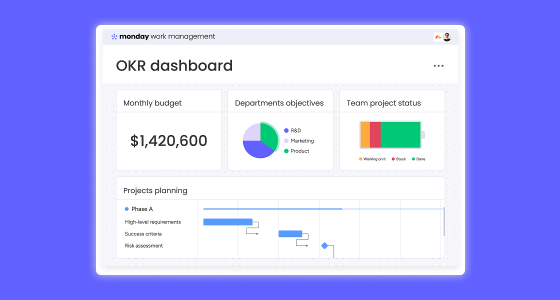
- Monitor progress: Use dashboards to view KPIs, budgets, timelines, and risks across all departments.
- Automate reporting: Deliver regular updates to stakeholders without manual effort.
- Uncover bottlenecks: Identify and resolve slowdowns at the task or team level.
- Celebrate achievements: Recognize milestones and cross-team successes to build morale and momentum.
Conclusion: Future-Proof Collaboration Starts Here
Siloed, linear project management no longer fits the complexity of modern business. By leveraging monday.com, you can create innovative cross-department workflows that foster transparency, accountability, and agility.
Start small, iterate often, and watch your organization grow stronger, smarter, and more connected. monday.com isn’t just a collaboration tool — it’s your foundation for a future-proof business.