From Task Lists to Workflows: How to Build Scalable Project Management Processes in monday.com
March 24, 2026
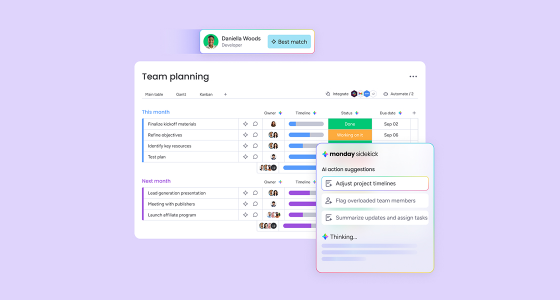
Checking boxes on a basic task list may work for simple projects, but it rarely works for growing teams, cross-functional collaboration, or repeatable delivery. As projects become more complex, teams need more than visibility into tasks. They need structure, ownership, consistency, and automation.
That is where process-driven project management makes the difference.
With monday.com, teams can move beyond static to-do lists and build workflows that support real execution. Instead of managing work in disconnected spreadsheets, informal boards, or scattered updates, they can create a centralized system that improves transparency, reduces manual work, and makes project delivery more consistent. This approach aligns with monday.com’s broader value as a Unified Work OS built to reduce fragmentation, streamline workflows, and help teams scale execution with less operational friction.
In this guide, you will learn how to transition your team from simple task tracking to structured workflows in monday.com, and how to build a system that is easier to manage, easier to scale, and easier for your team to trust.
Task lists are useful at the beginning. They help individuals or small teams track what needs to get done. But they usually break down when the work involves multiple owners, handoffs, approvals, dependencies, or recurring processes.
The problem is not that task lists are bad. It is that they are too limited for operational complexity.
When teams rely only on task lists, they often run into the same issues:
As work becomes more interconnected, teams need a workflow, not just a list.
Process-driven project management is the practice of designing work around repeatable stages, clear responsibilities, and visible progress. Instead of simply listing tasks, you define how work moves from one phase to the next, who owns each step, what triggers the next action, and where approvals or dependencies matter.
In monday.com, this means building workflows that reflect how your team actually operates.
That could include:
This matters because structure creates consistency. And consistency creates scale.
Before building anything in monday.com, start by understanding what is currently slowing your team down.
Look at the way work is being managed now and ask:
This step is essential because the best workflow is not the most complex one. It is the one that reflects your real operating model.
You should also identify the project types your team handles most often, such as onboarding, launches, implementation, campaign execution, internal approvals, or client delivery. These recurring processes are usually the best place to start.
Once you understand your needs, map out the ideal process before recreating it in the platform. This is where many teams rush, and it usually leads to messy boards.
Start by defining the key stages your work goes through. For example:
Then define what happens in each phase:
It is also important to identify dependencies. If one team cannot move until another team finishes a review, that should be built into the workflow logic.
This process mapping step helps you design a board that feels natural in use, rather than forcing the team to adapt to something artificial.
After mapping the process, you can build it in monday.com.
This is where the platform becomes more than a task tracker. It becomes the operational layer that connects people, status, timelines, updates, and automation in one place.
Create a board that reflects the logic of your process. In most cases, that means including:
Group items in a way that makes sense for your team. That could be by phase, project type, sprint, client, or business function.
Once the structure works, make it repeatable.
If your team handles similar projects over and over, save the board as a template. That way, every new project starts from the same structure, which improves consistency and reduces setup time.
As workflows mature, visibility becomes just as important as execution. Dashboards help teams and leaders see overall progress, risks, delays, workload, and timelines without asking for manual updates every time. monday.com’s broader positioning around visibility, performance, and cross-functional coordination reinforces why dashboards matter in process-driven work.
One of the biggest advantages of moving from task lists to workflows is automation.
A task list tells people what to do. A workflow can also help the work move forward on its own.
In monday.com, automation can support actions such as:
This is important because many teams lose time not in the work itself, but in the coordination around the work.
Automations reduce that coordination cost and make the process more reliable.
Workflow adoption is about behavior. If the team does not understand the purpose behind the workflow, they will treat monday.com like another tracker instead of the system that helps them work better. That is why onboarding matters.
Show the team:
Keep it practical. The goal is not to explain every feature. The goal is to help people understand how the workflow improves their day-to-day execution.
To make process-driven project management work long term, follow these principles:
Do not build a complex workflow on day one. Start with the core stages and only add complexity when needed.
If a process happens often, turn it into a template or repeatable board structure.
Comments, files, decisions, and status updates should live inside the workflow, not across multiple disconnected tools.
As the team changes, the workflow should evolve too. Run retrospectives and refine the structure over time.
Track metrics such as cycle time, overdue items, bottlenecks, completion rate, and team workload. Visibility should drive improvement, not just reporting.
Even with the right platform, teams can still create poor workflows.
Some of the most common mistakes include:
The best workflow is not the most elaborate one. It is the one your team will actually use consistently.
A strong example of this shift is COINLA. Before implementing monday.com, the company managed project tracking, reporting, field records, and legal procedures through disconnected systems, spreadsheets, paper forms, and separate tools. That created duplication of effort, manual errors, and poor real-time visibility.
After implementing monday.com as a central platform, COINLA was able to adapt workflows to internal processes, automate repetitive tasks through integrations, digitize manual forms, improve reporting, and increase traceability across operations. The result was a more collaborative, more visual, and more scalable system for execution.
That is the real value of moving from task lists to workflows. You are not just organizing tasks better. You are building a more reliable way to run work.
If your team is still managing projects with simple lists, informal boards, or disconnected updates, you may already be feeling the limits: unclear ownership, inconsistent delivery, low visibility, and too much manual coordination.
Moving to process-driven project management in monday.com helps solve that.
By designing repeatable workflows, standardizing how work moves, and automating the steps around execution, your team can operate with more clarity, more consistency, and more confidence.
Want to see what this would look like in your specific case? Contact us!