How to improve productivity in monday.com: tips, automations, and key features
April 21, 2026
monday.com can do far more than help teams track tasks. When it is set up with intention, it becomes a workspace that improves collaboration, reduces manual work, and gives teams better visibility into what is happening across projects and processes. Boards, dashboards, automations, integrations, and AI capabilities are all part of the platform’s current offering.
The real value is not just in using the platform, but in using it well. From automations and dashboards to integrations and AI-powered features, there are many ways to make work easier to manage without making operations more complex.
Before adding advanced automations or integrations, it helps to review the basics. A clean and organized workspace makes everything else easier to manage.
Archive outdated items and boards regularly. This reduces clutter and makes it easier for teams to focus on what matters.
Not everyone needs the same level of access. Clear permissions help protect sensitive information and reduce unnecessary edits.
If your team repeats processes such as onboarding, weekly planning, project delivery, or customer follow-up, templates save time and create consistency.
monday.com dashboards pull data from connected boards into a customizable view that helps teams track progress, monitor metrics, and see work more clearly in real time.
When teams use the platform every day, small efficiency gains add up. That is why it helps to simplify repetitive actions such as creating items quickly, updating multiple records at once, searching within boards, and keeping context directly inside the work itself.
These changes may seem small at first, but they become noticeable in teams managing a high volume of work.
One of the most useful parts of monday.com is its automation capability. monday’s official documentation states that automations can be used for task updates, notifications, status changes, due dates, and moving items across boards, among other use cases.
The goal is not to automate everything. It is to identify which repeated actions consume time and start there.
Some monday.com features do not always get the attention they deserve, yet they can significantly improve how teams work.
Filtering by owner, priority, date, or status helps teams focus quickly on what needs attention.
When multiple items need the same update, bulk actions save time and reduce repetitive work.
Linking information across teams or workflows helps preserve context without duplicating effort.
When comments, files, and decisions stay inside each item, collaboration becomes easier to follow.
Dashboards can do much more than display charts. monday.com describes them as a visual hub that brings together data from multiple boards into one customizable view for tracking progress, metrics, and overall work status.
The clearer the dashboard, the easier it is to turn data into action.
monday.com AI is no longer limited to a single feature. The official AI catalog brings together built-in assistants, AI blocks, AI-powered columns and automations, AI workflows, templates, and other capabilities designed to help teams move faster with less manual work.
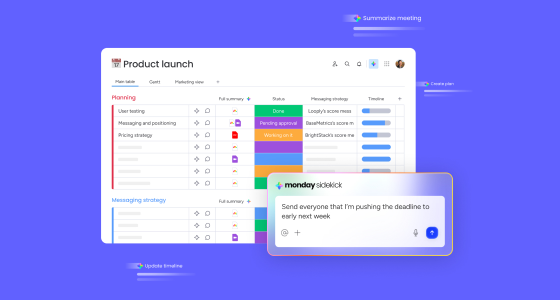
If a company wants to begin using AI in monday.com in a practical way, monday sidekick is a strong starting point. monday describes it as an intelligent assistant that brings together AI models, tools, and work apps in one place, using business context to support work through natural conversation. It can also be used at the account, board, and item levels.
What makes sidekick useful is that it brings AI into the real flow of work. Instead of pushing users into a separate tool, it supports them where their processes, tasks, and updates already live.
How monday sidekick can add value:
These use cases reflect monday’s positioning of sidekick as a contextual assistant built into work on the platform.
After sidekick, the next step for many organizations is monday vibe. monday presents it as an AI-powered no-code builder that turns prompts into functional, secure apps on the platform. Official support content also describes it as a way to create monday apps without previous coding experience.
The value here is different: sidekick helps teams work better within what already exists, while vibe opens the door to building something new when a standard board is no longer enough or when a team needs a more tailored experience.
How monday vibe can add value:
Beyond sidekick and vibe, monday groups additional AI capabilities into its platform. These include AI blocks, AI-powered automations and columns, AI workflows, AI templates, and the AI agent builder, which monday says can create native agents that monitor activity, make decisions based on defined rules, and execute tasks inside boards and workflows.
Where this layer can help:
The best way to begin is not to use everything at once. It is better to start with one clear use case, such as summarizing updates with sidekick or solving a specific need with vibe, and build from there.
A common problem in daily operations is that information gets scattered across emails, chats, documents, and meetings. monday.com helps centralize part of that context and can also connect with external tools such as Slack, Gmail, and Outlook through integrations.
As organizations grow, so do their projects, processes, and teams. That is why it helps to design a board structure that stays clear as operations become more complex.
A scalable structure improves onboarding, cross-team collaboration, and operational visibility.
monday.com integrations allow teams to connect external tools and automatically sync data and workflows. The official documentation highlights integrations with tools such as Slack, Gmail, and Outlook, alongside many others across the ecosystem.
The goal is not to add integrations for the sake of it, but to connect workflows that are still fragmented.
monday.com offers mobile apps for iOS and Android, making it possible to stay connected to work activity, review boards, and maintain continuity when you are away from a desktop.
Mobile access helps teams stay informed, respond faster, and keep work moving without depending entirely on desktop use.
No workspace should stay unchanged forever. Teams evolve, processes shift, and what worked a few months ago may need adjustment today.
monday.com becomes much more useful when clear structure, thoughtful automations, relevant dashboards, and practical AI usage come together. The platform’s current official capabilities span dashboards, automations, integrations, sidekick, vibe, and other AI components that help reduce friction and improve visibility.
Improving productivity is not about doing more at once. It is about reducing friction, keeping context close to the work, and building processes that are easier to follow. A strong place to start is reviewing your current boards, identifying one repetitive task to automate, and exploring how sidekick or vibe could add value in one concrete use case.