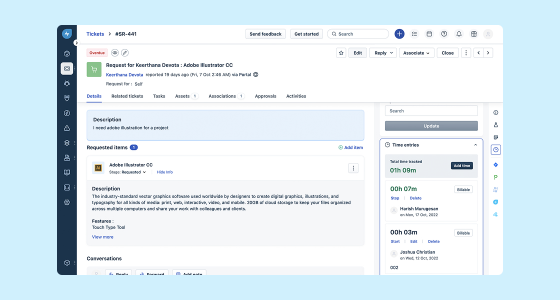
Migrating IT service management to a platform like Freshservice is not just about adopting new software. It also involves rethinking processes, organizing information properly, and preparing teams to work in a more agile and connected way.
But for that to happen, the process requires much more than simply moving data from one platform to another. There are important decisions along the way: what information to migrate, how to manage change, and how to ensure service continuity without disrupting operations.
That is why, before getting into the key considerations of a migration, it is worth understanding what makes an AI-powered ITSM platform like Freshservice a real improvement for the organization.
Why migrate to Freshservice? The value of an AI-powered ITSM platform
Legacy ITSM solutions often struggle to keep up with today’s business demands: think clunky interfaces, slow response times, limited automation, and high maintenance costs. By moving to Freshservice, organizations can benefit from:
- Scalability and flexibility: Easily adapt to organizational growth and changing needs with a cloud-based platform.
- Streamlined processes: Leverage automation, AI-driven workflows, and intuitive self-service portals for increased efficiency.
- Scalability and flexibility: Easily adapt to organizational growth and changing needs with a cloud-based platform.
- Cost-effectiveness: Lower overhead through simplified administration, automatic updates, and reduced downtime.
- Enhanced user experience: Empower both IT teams and end-users with modern, customizable interfaces.
- Integration capabilities: Seamlessly connect with other SaaS applications and IT operations tools.
However, realizing these advantages relies on a strategically executed ITSM transition. Let’s explore the critical steps for a smooth move to Freshservice.
Step 1: Establish Clear Goals and Success Metrics
Before diving into your Freshservice migration, outline your objectives. Ask yourself and stakeholders:
- What are our main reasons for upgrading IT service management?
- Which pain points with the legacy tool are most urgent to fix?
- What does a successful migration look like, in terms of timelines, cost, process improvements, and business outcomes?
Defining these goals helps maintain focus when challenges arise and enables you to measure ROI after the migration is complete.
Step 2: Assemble Your Migration Team and Stakeholders
Successful ITSM transitions depend on cross-functional collaboration. Your Freshservice migration team should include:
- ITSM owners: Those responsible for day-to-day service management.
- System administrators: Technical leads with knowledge of your legacy system and Freshservice features.
- Business stakeholders: Key process owners, service desk managers, and department heads.
- End-user representatives: Voices from those impacted by the transition (e.g., non-IT staff, knowledge workers).
- Project manager: To oversee timelines, coordinate activities, and manage risks.
- Vendor partners: Freshservice consultants or migration experts as needed.
Early and ongoing stakeholder engagement is vital. Aligning perspectives ensures that the new system reflects real-world workflows and minimizes pushback.
Step 3: Audit Your Legacy ITSM Environment
Understanding your existing ITSM setup is the foundation of an effective switch. Conduct an in-depth audit with attention to:
- Data Inventory: Identify data types such as tickets, change records, knowledge base articles, user profiles, assets, and CMDB entries.
- Customizations: List existing automations, custom fields, dashboards, SLAs, and integrations.
- Data Quality: Pinpoint duplicate tickets, outdated records, and inconsistent formats that may complicate migration.
- Workflows: Document core IT processes, incident, problem, change, and asset management—to inform configuration in Freshservice.
This step helps determine what’s essential to migrate and what can be archived or redesigned for improved efficiency in the new environment.
Step 4: Develop a Detailed Migration Plan
With your goals, team, and baseline assessment in hand, draft a practical step-by-step migration strategy. Key elements include:
- Scope definition: Decide what will be migrated (data, automations, configurations, knowledge base), what will be left behind, and if any information can be consolidated or retired.
- Timeline: Set a realistic schedule that accounts for preparation, testing, and end-user transitions, aim for minimal business disruption.
- Resource allocation: Assign clear roles for migration tasks, validation, communication, and support.
- Contingency plans: Prepare for unforeseen challenges with data integrity, system downtime, or user resistance.
- Cutover strategy: Choose between a "big bang" (all-at-once) or phased rollout, depending on your organization’s complexity and risk tolerance.
Tip: Collaborate with Freshservice or a certified migration partner for expert guidance on timelines, tool mapping, and best practices.
Step 5: Data Migration Best Practices for Freshservice
The heart of any ITSM transition is moving data accurately and securely. A robust data migration approach for Freshservice should include:
1. Data Cleansing and Preparation
- Remove duplicates, obsolete tickets, and irrelevant assets.
- Standardize record formats and naming conventions.
- Verify data mapping between your legacy ITSM and Freshservice fields.
2. Data Mapping and Sample Migrations
- Match old system fields (e.g., incident types, priorities, custom attributes) to their Freshservice equivalents.
- Conduct a test migration with a subset of your data for accuracy.
- Validate migrated sample records with ITSM owners and end users.
3. Secure and Compliant Data Transfer
- Encrypt sensitive data in transit using secure protocols.
- Maintain audit trails and backup copies to safeguard against data loss.
- Ensure compliance with regulatory standards such as GDPR, HIPAA, or internal policies.
4. Final Migration and Validation
- Schedule final data transfer during a planned outage window or low-activity period.
- Perform end-to-end validation of tickets, user access, workflows, and permissions.
- Document any issues for immediate remediation.
Step 6: Freshservice Configuration and Optimization
Don’t just replicate legacy features, take advantage of Freshservice’s modern capabilities to improve IT operations:
- Workflows and Automations: Use workflow automator, service catalogs, and approvals to streamline repetitive tasks.
- AI and Self-Service: Implement AI-powered virtual agents and robust self-service portals for routine inquiries.
- Role-Based Access: Define roles and permissions to control data visibility, enhancing security and compliance.
- Knowledge Base: Refresh and reorganize articles with easy search and presentation for end-users.
- Integrations: Connect Freshservice with collaboration tools, monitoring platforms, and asset management systems.
This phase is also the ideal time to review and update your SLAs terms, business rules, notification settings, and escalation paths.
Step 7: Testing and User Acceptance
Thoroughly test your new Freshservice environment before go-live. Focus on:
- Verifying migrated data for completeness and accuracy.
- Simulating typical service desk workflows from ticket creation to closure.
- Validating automations, escalations, and notifications.
- Testing role-based access and security policies.
- Gathering feedback from IT staff and business user representatives.
Encourage active user acceptance testing so real-world issues are identified and addressed early—ensuring smoother adoption on launch day.
Step 8: Change Management and Communication
Switching ITSM tools is as much about people as it is about technology. To drive adoption and minimize resistance during the Freshservice migration:
- Inform all stakeholders early about why the move is happening and the expected benefits.
- Provide tailored training and support materials for different user groups—agents, admins, and requesters.
- Set up phased communication—pre-migration updates, go-live announcements, and post-migration feedback channels.
- Appoint ITSM champions to answer questions and collect suggestions during the transition.
- Celebrate quick wins and early successes to boost morale and reinforce positive change.
Change management isn’t a one-off event; it should be embedded throughout the migration process and into steady-state operations.
Step 9: Post-Migration Support and Continuous Improvement
After go-live, a successful ITSM transition continues with effective post-migration support. Essential actions include:
- Providing an accessible helpdesk for Freshservice-related questions and troubleshooting.
- Monitoring key metrics such as user adoption, ticket resolution times, and customer satisfaction.
- Holding regular review meetings to address issues, gather user feedback, and adjust processes as needed.
- Leveraging Freshservice’s analytics and reporting tools to visualize progress toward your defined success metrics.
- Iterating and optimizing workflows, automations, and service catalogs based on real-world usage and performance data.
Remember: IT service management is an ongoing journey. Continue to evaluate and innovate—taking advantage of Freshservice’s new features and community best practices.
Common Pitfalls and How to Avoid Them
It is easy to overlook certain details during the transition to a new ITSM solution. Below is a checklist you can use throughout your Freshservice implementation:
- Identify your goals and KPIs for switching ITSM tools
- Build a cross-functional migration team
- Audit data, processes, and requirements in your legacy system
- Create a migration plan, timeline, and risk management framework
- Cleanse and map data for Freshservice compatibility
- Configure Freshservice with optimized workflows, automations, and integrations
- Test thoroughly—run UAT with power users
- Prepare and deliver comprehensive user training
- Communicate regularly at all stages
- Offer post-migration support and measure outcomes
- Iterate based on feedback and analytics
Lead a secure and seamless ITSM transition
Migrating to Freshservice is not just about switching tools, but about taking a step toward a more modern, agile, and business-ready approach to IT service management. When done well, this transition can lead to more structured processes, greater automation, and a better experience for everyone involved.
The key is to plan with intention, make sound decisions from the start, and manage change in a practical way. This way, the migration not only reduces friction in the short term, but also builds a stronger foundation for growth and continuous improvement.
If you are exploring how to move toward a more efficient ITSM operation with Freshservice, GB Advisors can support you throughout the process and help turn migration into a strategic decision, not just a technical one.